When building a Bring-Your-Own-Key (BYOK) developer tool, security isn’t just a feature—it is the entire foundation.
Packaged translation subscriptions are expensive, while direct API calls to AI models are incredibly cheap. But developers are rightfully cautious: How do you keep a high-privilege API key safe?
Many extensions take the easy path: they store your API keys in plain text inside basic storage, or sync them to a custom cloud database. If their backend database is compromised, your keys are leaked.
In Your AI Translator, we resolved this by designing a local-first encrypted vault. Here is the core philosophy behind our security model.
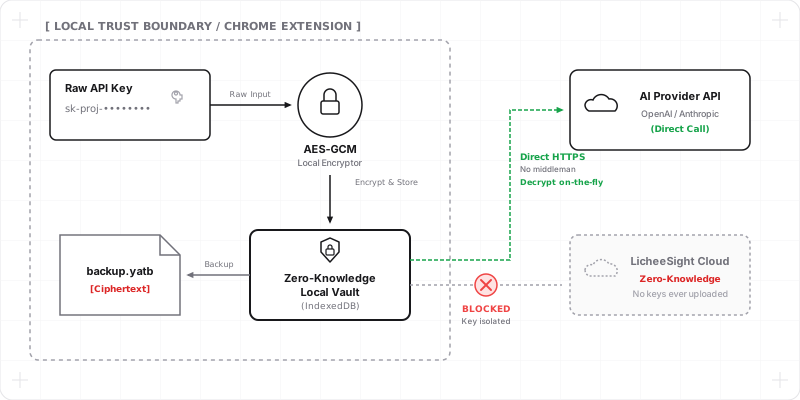
1. Local-First Boundary
We established a strict boundary: your API keys are never sent to LicheeSight’s servers.
Key storage and encryption happen locally on your machine. When you enter your API key, it is immediately processed inside the extension’s local environment. The plain text key is never exposed to LicheeSight’s backend systems, and we have zero visibility into your credentials. When you actively translate or ask a model, the request is sent from your browser to the provider you selected.
2. Local Encryption & Memory Management
Instead of relying on basic browser storage in plain text, your keys are secured using industry-standard AES-GCM encryption before being saved to browser local storage (IndexedDB).
Furthermore, we manage key material securely in memory during runtime:
- Idle Lock: The extension monitors browser activity. When your system goes idle or locks, the extension automatically clears active key material from in-memory session variables.
- Decryption On-The-Fly: Keys are decrypted only at the exact moment they are needed to sign a direct API request, minimizing the window of exposure.
3. Chrome Sync & Secure Snapshots
To allow you to sync your settings across devices without building a central database, Your AI Translator utilizes Google Chrome Sync. When sync is enabled, the extension saves an encrypted snapshot of your configuration to Chrome Sync. This snapshot is encrypted locally with a passphrase before being saved to Chrome Sync. Google Chrome Sync handles the cross-device transport of this encrypted payload, ensuring that LicheeSight servers never receive or store your plaintext keys.
4. Passphrase-Encrypted Backups
To allow you to manually transfer your settings, custom prompt libraries, and encrypted keys between devices (e.g. from your home workstation to your work laptop) without using cloud sync, we designed a secure manual export format.
Before downloading your backup file, the payload is compiled and encrypted locally on your machine using a passphrase of your choice. The resulting file contains only ciphertext. You can safely save this backup to a flash drive or share it via cloud storage, knowing the raw keys can only be decrypted by someone who knows your custom passphrase.
Realistic Security & Best Practices
While local-first encryption isolates your API keys from remote database breaches and LicheeSight backend leaks, software-level encryption cannot promise absolute protection against root-level malware on your machine. If an attacker has full administrative/physical control over your operating system, they can inspect memory or log keys.
To achieve optimal security, we recommend:
- Setting Usage Limits: Configure budget caps directly in your OpenAI, Anthropic, or Google AI console so that any potential leak is capped at a low cost.
- Using Scoped Keys: Generate keys that are restricted only to translation model scopes rather than full admin access.
- Local Machine Hygiene: Keep your local operating system updated and run reputable malware protection.
By combining sandboxed local storage, idle memory locks, and a strict no-server data collection model, Your AI Translator lets you leverage the raw economics of BYOK without compromising your peace of mind.