You want to try AI-powered translation, but the setup page asks for an API key. Where do you get one? Does creating a key cost money? Will you receive a surprise bill later?
The short answer is simple: creating an AI API key is usually free, and several providers offer free usage tiers. Every free tier has limits, however. Each provider decides which models are included, how many requests you can make, and whether billing details are required.
With Your AI Translator, you bring a key from the provider you choose. LicheeSight does not resell your AI usage or add a markup to the provider’s token charges. This guide shows three beginner-friendly places to start and how to connect a key to the extension.
Free-tier details in this guide were checked in July 2026. Provider limits, model availability, regional access, and data terms can change, so review the linked provider pages before signing up.
1. What Is an AI API Key?
An API key is a private code created inside your AI provider account. It allows Your AI Translator to send a request to that provider on your behalf.
Think of it like a dedicated access pass. The extension uses the pass when you request AI assistance, while the provider records the usage on your account. Your key is separate from your normal account password and can be removed or replaced from the provider’s dashboard.
Because the key belongs to you, keep it private. Do not paste it into public documents, screenshots, support messages, or websites you do not trust.
2. Is an AI API Key Really Free?
There are three different ideas that are easy to confuse:
- Creating a key: Usually free after you create a provider account.
- Using a free tier: Some models and requests are available without token charges, up to the provider’s limits.
- Using a paid model: The provider charges your account based on usage after you enable billing or purchase credits.
Some providers let you start without a card. Others may ask you to enable billing even when a monthly credit or allowance covers light usage. OpenAI and Anthropic keys, for example, should not be described as automatically free to use because some accounts need paid credits before API requests work.
Free tiers are best treated as a starting point rather than a permanent guarantee. A provider may change its supported models, daily request limits, availability, or eligibility rules.
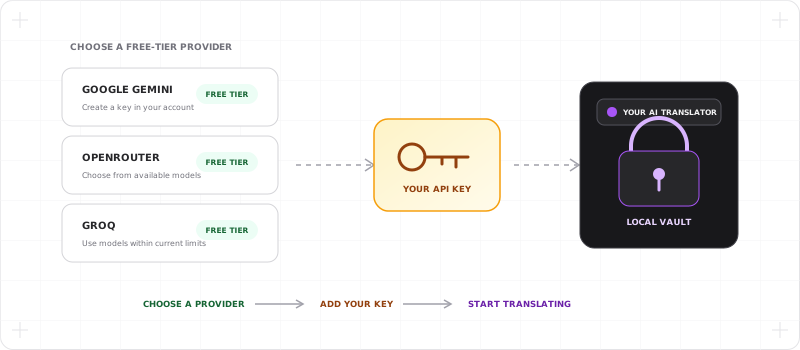
3. Three Free-Tier Providers to Start With
Google Gemini
Google lists a Gemini Developer API free tier with free input and output tokens for supported models. Limits depend on the model and account, and Google AI Studio may not be available in every region.
- Create a key: Google AI Studio
- Check current terms: Gemini API pricing
Gemini is a straightforward first choice if you already have a Google account.
OpenRouter
OpenRouter offers a collection of free models and a free model router. Its free plan currently has daily and per-minute request limits, and free-model availability may vary when demand is high.
- Create a key: OpenRouter API Keys
- Check current terms: OpenRouter pricing and limits
OpenRouter is useful when you want to try several model families.
Groq
Groq publishes Free Plan rate limits for supported models. The exact request and token limits vary by model and are applied at the organization level.
- Create a key: Groq Cloud API Keys
- Check current terms: Groq rate limits
Groq is a good option when you want fast responses from its available open-model catalog.
4. How to Add the Key to Your AI Translator
Once you have created a key, connecting it takes only a few steps:
- Open Your AI Translator Settings.
- Select Providers.
- Choose Gemini, OpenRouter, Groq, or another supported provider.
- Select Add API key.
- Give the connection a recognizable name and paste the key.
- Choose an available model, save the connection, and run the connection test.
If the test fails, confirm that the provider, key, model availability, and free-tier limit are correct.
5. What BYOK Means for Your Cost
Bring Your Own Key (BYOK) means your AI relationship stays between you and the provider. When a request uses your key, the provider applies its own free allowance or bills your provider account according to the model you selected.
Your AI Translator does not add a markup to those provider token charges. Extension plans are separate: some advanced Your AI Translator features may require an active plan or trial, but that is not the same as provider usage.
For a closer look at the economics, read why BYOK translation can cost much less than bundled AI subscriptions.
6. Use More Than One Free-Tier Provider
Your AI Translator supports multiple provider connections. You can connect Gemini, OpenRouter, and Groq, then choose the connection that fits what you are doing.
If you add at least two enabled connections for the same provider, the extension can use Round robin to rotate between those connections. You can also keep different providers ready and switch when one provider is unavailable or reaches a limit.
This does not mean creating extra keys will multiply one provider’s free allowance. Many providers apply limits at the account or organization level. The legitimate advantage comes from having independent provider options, each governed by its own terms and quota.
7. When Is a Free Tier Enough?
A free tier can be enough for personal translation, occasional writing help, and trying Smart Read or Sidebar Chat at a light volume. Your actual experience depends on the length and frequency of requests, the selected model, and the provider’s current limits.
Consider paid usage when you need higher limits, a specific premium model, more consistent availability, or different data-handling terms. Set a small spending cap in the provider dashboard before enabling paid usage, then review the local usage view in Your AI Translator regularly.
Your key deserves the same care as any private credential. Read how Your AI Translator protects BYOK keys in its local-first vault before adding your first connection.
Start with one free-tier provider, confirm that it works for your reading and writing habits, and add another provider only when you have a clear reason. BYOK gives you that choice without hiding the provider or its pricing behind a bundled AI fee.