
Traditional translation engines are fundamentally static. Whether translating a conversational tweet, an API documentation page, or a cryptographic whitepaper, conventional machine translation tools apply the same generic statistical dictionary.
While standard translation works well for daily conversational text, it fails spectacularly when faced with specialized technical terminology. A phrase like “thread-safe runtime environment with zero-copy buffer allocations” is often translated into awkward, literal nonsense that obscures the author’s technical meaning. For software engineers, data scientists, and researchers, it is far more productive to keep core domain terms in English while translating only the connective prose.
Because Your AI Translator allows you to leverage modern LLMs (such as GPT-4o, Claude 3.5 Sonnet, and Gemini 1.5) with custom system prompts, you can instruct the translation engine to adapt directly to your specific professional domain.
1. Why Generic Machine Translation Breaks Technical Text
When a standard translation model encounters code comments or engineering documentation, three common failure modes occur:
- Destruction of Identifiers: Compound identifiers in
camelCase,snake_case, orkebab-case(such ashandleRequestTimeoutormax_retry_count) are split into disjointed words, destroying their syntax. - Literal Idiom Confusion: Computing idioms like “garbage collection”, “race condition”, or “cold boot” get translated into literal physical actions rather than accepted technical concepts.
- Loss of Code Block Integrity: Markdown code fences (
`inline_code`ortypescript blocks) are frequently stripped, translated, or re-punctuated with full-width characters that break copy-pasting.
By supplying explicit system prompt rules, you instruct the AI model to act as a bilingual domain expert rather than an automated dictionary.
2. Four Battle-Tested Prompt Templates
Here are four production-tested prompt templates you can copy directly into your Your AI Translator prompt library.
Prompt 1: The Software Engineer & Code Comment Prompt
Designed for reading GitHub PRs, Stack Overflow discussions, and official API references.
You are an expert bilingual software engineer. Translate the following text into the target language with these strict rules:
1. Do NOT translate programming keywords, library names, CLI commands, or API endpoints (e.g., async/await, Docker, Kubernetes, fetch()).
2. Preserve all camelCase, PascalCase, snake_case, and kebab-case variable names in their exact original form.
3. Maintain all inline backticks and markdown code fences without altering spacing or punctuation.
4. If a standard technical term has no ubiquitous localized equivalent (e.g., "middleware", "thread pool", "deadlock"), keep the English term intact.
5. Provide a direct, natural translation without introductory greetings or conversational commentary.
Prompt 2: The Academic & Research Paper Prompt
Engineered for arXiv preprints, medical journals, and mathematics papers where objective precision is paramount.
You are an academic researcher and translator. Translate the provided text into the target language following these constraints:
1. Maintain a rigorous, formal, and objective academic register.
2. Keep all mathematical notations, LaTeX formulas, variable subscripts, and citation brackets (e.g., [12], (Smith et al., 2024)) completely untouched.
3. Translate specialized terminology using standard scientific nomenclature recognized in peer-reviewed literature.
4. Do not summarize or simplify dense paragraphs; preserve the exact logical rigor of the source passage.
Prompt 3: The Natural Product & UI Localization Prompt
Ideal for translating user interface copy, mobile app strings, and marketing landing pages where character count and natural cadence matter.
You are a native copywriter and localization specialist. Translate the following UI copy into the target language:
1. Focus on natural, native user intent rather than word-for-word literal translation.
2. Adapt cultural idioms and colloquial phrases into their culturally resonant native counterparts.
3. Respect UI string constraints: keep translations punchy, concise, and suitable for buttons, toasts, and dialog headers.
4. Retain standard UI variable tokens such as {username}, %s, or $count without modification.
Prompt 4: The Linguistic Breakdown Prompt (For Language Learners)
If you are learning a language rather than just reading it, you can turn your translator into a personal tutor. (See also our guide on how to read a foreign language without translating every word using Smart Read).
You are a linguistics tutor. Translate the following sentence into the target language, and immediately follow it with:
1. A bulleted list breaking down the key idioms, grammatical structures, or verb conjugations used in the sentence.
2. The nuance and formality register (e.g., casual, polite business, humble).
3. One alternative phrasing that conveys the same meaning in a different tone.
3. Side-by-Side Comparison: Generic vs. Domain-Aware Translation
To see the difference in practice, observe how a standard translation engine compares to Your AI Translator running the Software Engineer Prompt:
| Source Text | Generic Machine Translation | Your AI Translator (Custom Prompt) |
|---|---|---|
| “The worker process crashed due to an unhandled promise rejection in the middleware pipeline." | "Quá trình công nhân bị rơi do lời hứa bị từ chối không được xử lý trong đường ống đồ mềm.” (Incoherent) | “Tiến trình worker bị crash do unhandled promise rejection trong pipeline middleware.” (Accurate) |
“Ensure the authHeader is sanitized before passing to validateSession()." | "Đảm bảo đầu xác thực được vệ sinh trước khi chuyển qua kiểm tra phiên.” (Breaks code) | “Đảm bảo authHeader được sanitize trước khi truyền vào validateSession().” (Preserves syntax) |
Notice how the custom prompt retains the identifiers (authHeader, validateSession()) and industry terms (worker, crash, pipeline, middleware) that developers immediately recognize.
4. Tuning Response Styles & Sampling Temperatures
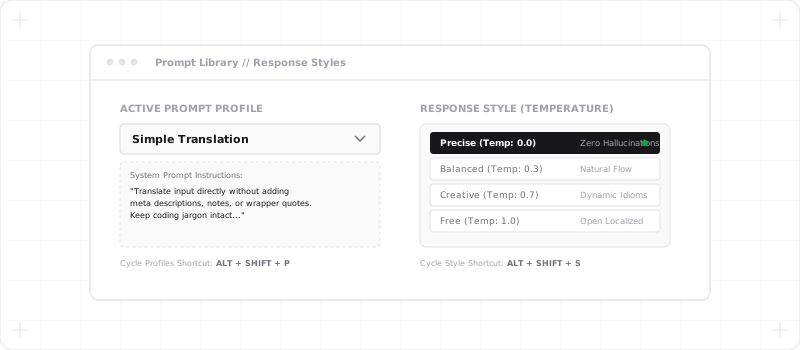
A well-crafted prompt works best when paired with the right sampling temperature. In Your AI Translator, temperature is controlled via the Response Style selector:
- Precise (Temperature ~0.1): Perfect for the Developer and Academic prompts. Enforces strict instruction following, predictable syntax handling, and zero hallucinated stylistic flourishes.
- Balanced (Temperature ~0.5): The recommended baseline for general articles, news, and business communications.
- Creative (Temperature ~0.8): Ideal for the UI & Marketing localization prompt, where the AI needs room to explore creative phrasing and idiomatic alternatives.
- Free (Temperature ~1.0): Best for conversational chats and social media discussions where high variability and casual banter are desired.
You can also leverage these response styles interactively when inspecting webpage elements inside our Context-Aware Sidebar Chat.
5. Hotkey Switching: Changing Profiles in One Keystroke
Having multiple specialized prompts is only effective if switching between them takes zero effort. In Your AI Translator, each prompt configuration can be saved as a named Profile in your personal library and assigned to global hotkeys.
- Press
Alt + Shift + Pto cycle through your saved prompt profiles (e.g., jumping from Dev Docs to Formal Academic). - Press
Alt + Shift + Sto cycle response styles on-the-fly. - Pair prompt profiles with our mouseless keyboard workflow to translate hover targets or word hints at maximum speed without ever lifting your hands from the keyboard.
Conclusion
AI translation is only as smart as the instructions you provide. By replacing generic translation models with targeted system prompts and tailored response styles, you eliminate awkward machine translation artifacts and create a translation experience built precisely for your workflow.
Open the settings in Your AI Translator, import the prompts above, and experience domain-accurate translation on your favorite websites.